In Falsus Complete Demo Walkthrough
From wishlist to MIN clear to Iota crafting — step by step.
This walkthrough covers every step of the In Falsus Steam demo (v0.3.1): the opening cinematic, hub navigation, character selection, your first chart clear, the Encounter system, and the Iota card lab. It is written for players who have installed the demo and want a guided path rather than exploration.
The demo walkthrough video above shows real gameplay. Watch it alongside this guide for visual reference on menu layouts and UI placement.
Step 1 — Opening and Initial Setup
After launching the demo, you arrive at the title screen. lowiro’s logo appears first, then the In Falsus title card with the option to start or continue.
On first launch, you have no save data. Select New Game. The game asks you to choose a subtitle language — English, Japanese, or one of the Chinese variants. This affects Scenario text only; audio remains Japanese throughout.
The opening cinematic plays. You see a classroom, five girls, and collars that glow and pulse. A narrator voice explains the world: a society where lies are physically exposed, and the sky is covered by a Shroud. This is your context. You are not dropped into a generic rhythm game.
Step 2 — The Hub
After the cinematic, you arrive at the Hub. This is the central navigation screen. Store art labels it the Home screen, but Hub is the term the community uses because it connects to every other mode.
From the Hub you can access:
- Song Select — the pack browser with jacket tiles and difficulty numbers
- Scenario — the visual novel story mode
- Cards / Iota — the Blueprint integration lab
- Settings — keybind planner, audio, display
- Character — profile viewer for the five protagonists
Do not rush past the Hub. Check Settings first and remap your Floor keys if the default layout does not fit your hand.
Step 3 — Character Selection
Before you play any chart, the demo allows you to select which protagonist’s perspective you want. The five icons in the character bar are:
- Nia Cana — quiet, isolated, leaks blue
- Mei Alder — performs at night, lives alone
- Ayame Takatsuki — social, art student, lie detector
- Iris Leal — confrontational, swing-first problem solver
- Story Étienne — Mute, opted out of the Bind’s broadcast
Selecting a character changes the Scenario perspective and some Encounter context. It does not change which songs are available. For this first walkthrough, select Nia Cana as the default perspective.
The calendar in the character select screen reads year 10277. This is the in-fiction calendar used throughout the game. Remember it for the Remembrance system in Encounters.
Step 4 — Song Select and Your First Chart
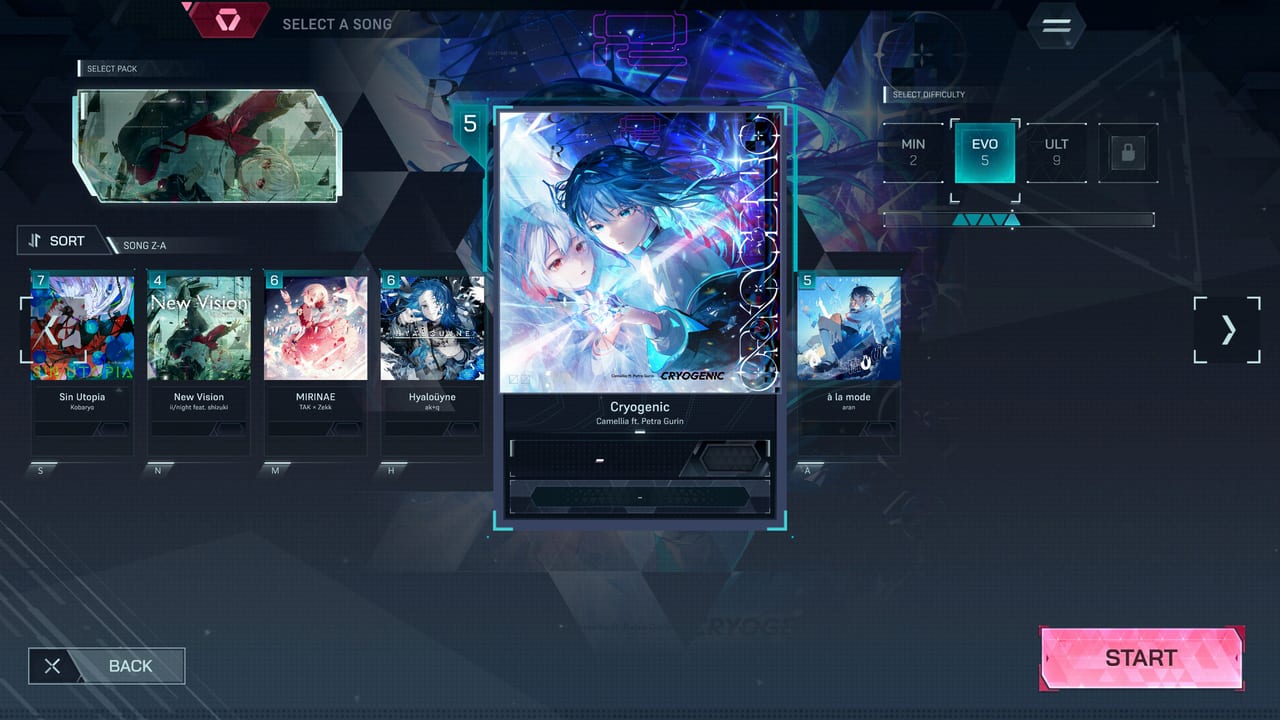
Open Song Select. You see jacket tiles arranged in a grid. The demo shows:
- Cryogenic (MIN 2, EVO 5, ULT 9, FBD locked)
- Hyaloüyne (MIN 3, EVO 6, ULT 10, FBD locked)
- Ordirehv (MIN 1, EVO 4, ULT 8, FBD locked)
- à la mode (MIN 1, EVO 5, ULT 9, FBD locked)
- Ghost Ray (MIN 1, EVO 4, ULT 8, FBD 10)
- Deep Into The Vibe (added in v0.3.0, MIN 3, EVO 6, ULT 10, FBD locked)
For your first clear, choose Ordirehv MIN 1. It is the lowest difficulty in the demo and teaches the basic Floor lane rhythm without Field complications.
Step 5 — Playing Your First Chart
The chart starts. Floor keys appear in lanes at the bottom of the screen. Notes scroll downward. The timing windows are EXACT (perfect), GREAT, GOOD, and Miss.
For Ordirehv MIN 1, only Floor lanes are active. There are no Field flicks. Focus on:
- Reading the lane position of each note
- Hitting the timing window cleanly
- Building a full combo
Do not worry about score percentage on your first pass. A clean MIN 1 clear with two or three misses is fine. The goal is to understand how notes arrive and how the timing feels.
When the chart ends, the results screen shows:
- Performance Score — your accuracy on the chart
- Grade — S, A, B, C, or lower based on accuracy
- EXACT / GREAT / GOOD / Miss counts
- Full Combo indicator if you hit every note
Step 6 — Dive and Encounter Introduction
After your first clear, the game introduces the Dive system. A Dive is a story-pinned Encounter — a chart tied to a narrative moment.
The demo’s first Dive is “Unclear Dive” against Ghost Ray. The Encounter screen shows:
- Remembrance 1 | 10276/8/27 — where this fight falls in the story calendar
- Difficulty Rating — the chart difficulty
- Card Loadout — your five-card slot (starts empty)
Equip one of your starting cards before entering. You begin with two: Nia: Path to Reality (Red) and Mei: 4AM (Blue). Select Nia’s card for this Dive.
The Encounter chart is Ghost Ray MIN 1. Play it following the same Floor-lane basics from Step 5. During the chart, your card’s Power and Defence contribute to the Encounter Score.
Step 7 — Dive Results and Ranks
After the Encounter, the results screen splits into two sections:
- Performance results — accuracy, grade, combo
- Encounter results — Power applied, damage dealt, Resolve remaining
The rank system for Encounters uses stars rather than letters. Higher card stats and better accuracy produce higher star ratings. A failed Encounter — where your Resolve reaches zero — means the Dive does not progress. You can retry immediately.
Step 8 — What to Do When a Dive Fails
If your Resolve drops to zero during a Dive, you do not lose progress permanently. Retry from the Encounter screen with your current cards and loadout.
Common reasons for Dive failure in the demo:
- Chart difficulty too high — drop to MIN and retry
- No cards equipped — add at least one Integrated card
- Card penalties too severe — rebuild your Blueprint with zero penalties
- Color disadvantage — check the Encounter’s colour and switch to an advantaged card
Step 9 — Iota and Card Integration Lab
After your first Encounter, return to the Hub and open Cards / Iota. This is where you craft new cards from collected Iota pieces.
The lab shows your current Blueprints on the left and the Iota inventory on the right. Select Nia: Path to Reality.
The Blueprint is a hex grid with coloured Zones (Red) and blank tiles. Drag Iota pieces from your inventory onto the grid. Rules:
- Pieces cannot be rotated or flipped
- Overlapping more than three pieces on one tile triggers Overlap penalty
- Exceeding the Iota Limit triggers Overload penalty
- Pieces hanging off the grid edge trigger Out of Bounds penalty
- Pieces not touching a blank tile trigger Falsehood penalty
For your first craft, place two or three Iota on red Zones only. Ignore the corners. Aim for zero penalties.
When the preview shows acceptable Power and Defence, press Integrate. Your new card is now available for loadouts.
Step 10 — After the Demo
With your first chart clear, first Encounter, and first card craft complete, you have seen the core loop:
- Play charts → earn Iota
- Place Iota → Integrate cards
- Equip cards → enter Encounters
- Clear Encounters → progress the Scenario
From here, the demo invites you to:
- Clear every MIN you own
- Try one EVO on a song you already know
- Watch one full voiced Scenario scene without skipping
- Integrate a second Blueprint without chasing perfection
The beginner tips guide covers the 20 most common mistakes new players make. Read it before you spend an hour on a bad Blueprint.
The full game launches September 9, 2026. The demo remains as a free introduction. Your card collection and Scenario progress in the demo do not carry over.
Frequently Asked Questions
Quick answers for demo players and launch-week questions.
What is the first song I should play in the demo?
Ordirehv MIN 1. It has the lowest difficulty and no Field flicks, making it ideal for learning the Floor lane rhythm.
Does character selection affect available songs?
No. Songs are the same regardless of which protagonist's perspective you choose. Character selection changes Scenario context and Encounter flavour.
Why does my Encounter show Remembrance 1 | 10276/8/27?
Remembrance tracks where an Encounter falls in the in-fiction calendar. This is narrative placement information, not difficulty scaling.
What happens if my Resolve reaches zero in a Dive?
The Dive fails. You can retry immediately from the Encounter screen. Failed Dives do not permanently cost you progress.
Do my demo cards and Iota carry over to the full game?
No. Demo saves are separate from the purchased game. Everything in the demo stays in the demo.