In Falsus Keybind Planner
Layouts that keep the Field on the mouse and the Floor on keys you can actually hold.
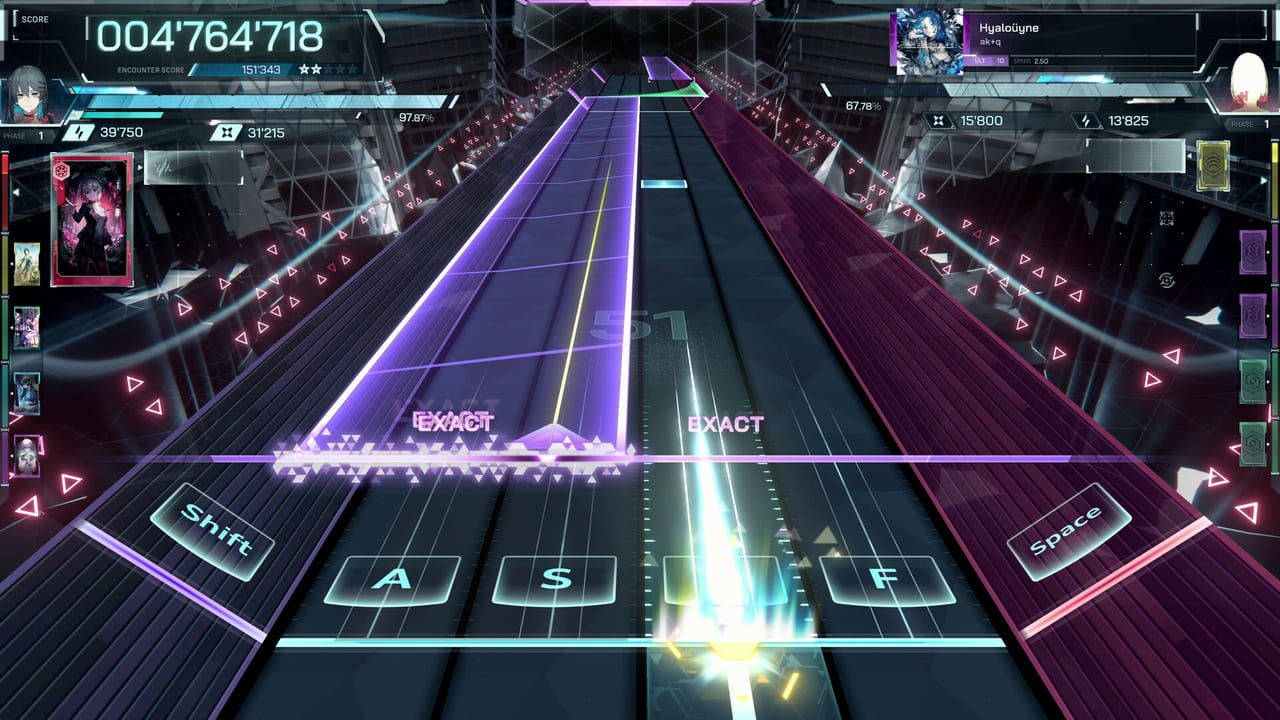
This page is a bind notebook, not a downloadable overlay. In Falsus lets you remap. The demo’s default is still the reference: Left Shift, A, S, D, F, Space for the six Floor lanes, mouse for the Field. Read controls for note types, then use the recipes below when something hurts.
Layout 0 — default, MIN subset
On MIN you do not need six keys. Rest four fingers on the live lanes and ignore the sleeping side. If Flipped Gameplay mirrors the active side, rest on the mirrored four instead. Play a whole session like this before you remap. Most “I need six fingers” comments are people skipping this step.
Layout 1 — home row, Shift replaced
Keep A S D F. Move the outer-left lane off Left Shift onto Q, Caps Lock, or Left Ctrl if your pinky hates the stretch. Keep Space as the outer-right thumb. This is the least dramatic change and the one to try first after Layout 0.
Layout 2 — two-hand Floor, mouse still mouse
Some players split Floor across both hands (for example S D F Space on the right, two side keys on the left) and put the Field on a trackpad or a second mouse. That can work for ULT. It also wrecks the official idea of one keyboard hand plus one mouse hand. Try it only after EVO feels honest. Never bind Floor taps to mouse buttons if the Field still needs that mouse.
Layout 3 — left-handed
Mouse in the left hand. Keys under the right. Flip Gameplay if side lanes feel mirrored wrong. Copy Layout 1 onto J K L ; or onto a numpad. The game is not right-hand exclusive. The Field is exclusive about needing analog motion.
Layouts to treat as experiments, not advice
- Drawing tablet plus stylus buttons: mentioned in comments, not supported as an official mode.
- 3+3 with thumbs on a laptop trackpad: a speedrunner toy.
- Controller: undocumented as a first-class scheme. Steam Deck Playable does not equal a native gamepad chart.
If an experiment works, write it down. If it only works on MIN 2, it does not work.
Checklist after a remap
- Re-run the onboarding notes if the build has them.
- Play Cryogenic MIN. If you miss more than before, revert.
- Play Hyaloüyne MIN and watch flicks. If the Field died because your mouse hand is now also hitting keys, revert.
- Only then try EVO.
What belongs on which device
| Job | Device |
|---|---|
| Floor taps and holds | Keyboard |
| Field motion and flicks | Mouse (or a true analog substitute) |
| Menu confirm | Whatever the UI already uses |
| Panic pause | A key you will not hit during a trill |
Related pages
Difficulty names: MIN EVO ULT FBD. Hardware: system requirements. Practice order: beginner songs. If you remap every hour, you are avoiding practice. Pick a layout for a week.
Launch may add official presets. Until then, these recipes are the planner. No overlay, no macro, no script — this is a PC rhythm game, not a Roblox executor page.
Frequently Asked Questions
Quick answers for demo players and launch-week questions.
What are the default keys?
Left Shift, A, S, D, F, and Space for Floor, plus mouse for the Field.
Should I remap before my first MIN?
No. Play default MIN first. Remap if a stretch hurts after that.
Can I put Floor notes on mouse side buttons?
You can try. You will probably steal motion from flicks. Keep Floor on keys.
Is there an official overlay?
No. This page is a layout notebook. See controls for the playfield.