In Falsus Blueprint Solver
Validate hex placements before you commit Iota. No install. No account.
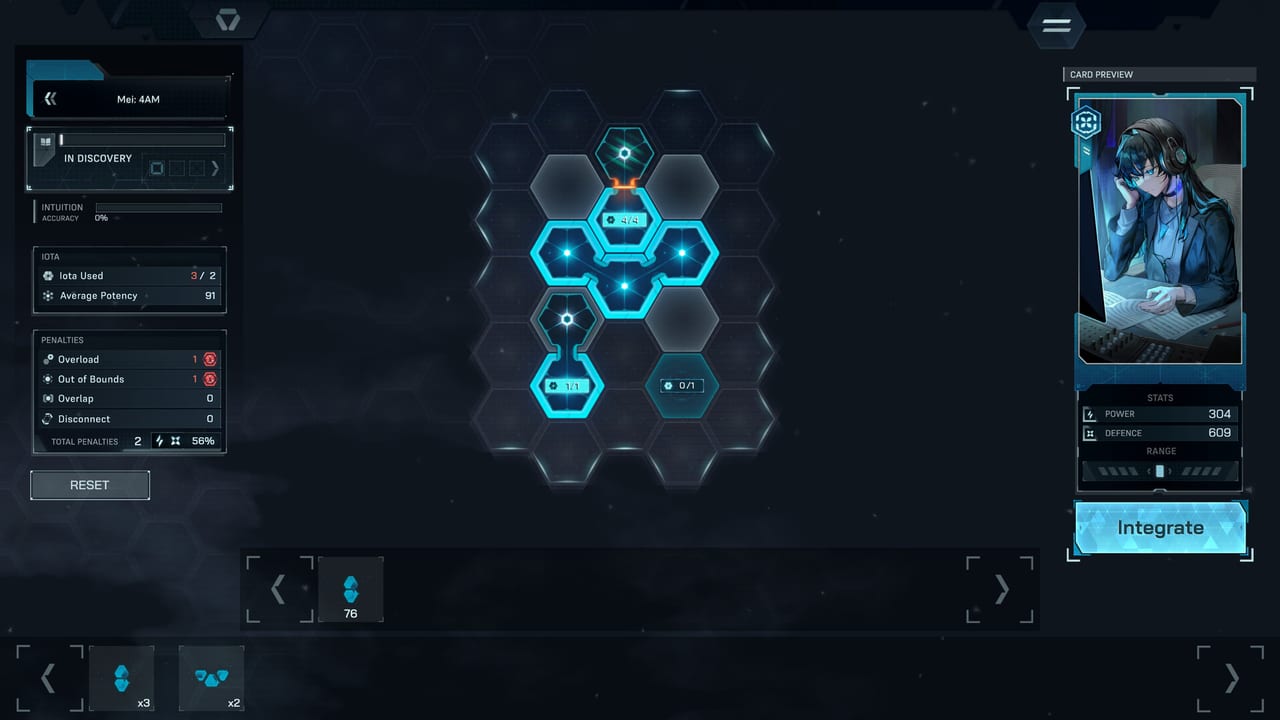
The Blueprint Solver at infalsus.org/tools/blueprint-solver is a free browser tool for planning Iota placement on In Falsus hex boards. It validates all five placement penalties, estimates final Power and Defense, and runs entirely client-side — no install, no account, no data sent to a server.
Use it before you spend Iota in the actual game. The tool prevents Overload, Out of Bounds, Overlap, and Disconnect mistakes that would otherwise cut your card’s stats to 89%, 56%, or 0%.
What the solver does
-
Select a Blueprint — choose from the five named boards: Nia Cana’s Path to Reality (Red), Mei Alder’s 4AM (Blue), Ayame Takatsuki’s A Warm Gaze Seeking Others (Green), Iris Leal’s Lost Garden of Bonds (Yellow), or Story Étienne’s First Drop of Abyss (Purple).
-
Place Iota — drag hex pieces onto the grid. Shapes cannot be rotated or flipped, matching the in-game constraint.
-
Validate — the solver checks all five penalties in real time:
- Overload — pieces exceed the Blueprint’s Iota Limit.
- Out of Bounds — a piece hangs off the grid edge.
- Overlap — more than three pieces share a single tile.
- Disconnect — placed pieces are not connected to the grid.
- Falsehood — no piece touches a safe (blank) tile.
-
Read estimated stats — Power and Defense update as you place pieces. The formula is:
STATS = (Σ FILLED ZONES) × POTENCY MULT × PENALTY REDUCTION
POTENCY MULT = AVERAGE POTENCY ÷ 100
-
Iterate — adjust placement until penalties read zero and stats look acceptable.
When to use it
-
Before your first Integrate in the demo. You start with two cards (Nia: Path to Reality, Mei: 4AM) and a limited Iota pool. The solver helps you place those first pieces without wasting materials on a 56% craft.
-
When farming new Iota. After a farming run, open the solver and test whether the new pieces improve any active Blueprint before you spend them.
-
When comparing Blueprint options. The same Iota set can fit multiple boards differently. The solver lets you test both before choosing which card to Integrate.
What it cannot do
The solver is a placement planning tool. It does not:
- Connect to your Steam account or sync card progress.
- Pull live drop tables from the game.
- Simulate an Encounter or compute damage against a specific enemy.
- Replace the actual Integration menu — you still place pieces in-game and hit Integrate.
Blueprint comparison at a glance
| Blueprint | Character | Color | Iota Limit | Zones | Trait Slots |
|---|---|---|---|---|---|
| Path to Reality | Nia Cana | Red | 10 | 8 | 2 |
| 4AM | Mei Alder | Blue | 9 | 8 | 2 |
| A Warm Gaze Seeking Others | Ayame Takatsuki | Green | 11 | 8 | 3 |
| Lost Garden of Bonds | Iris Leal | Yellow | 10 | 8 | 2 |
| First Drop of Abyss | Story Étienne | Purple | 12 | 9 | 2 |
Values are demo prototype figures; check the tool for the latest numbers.
Related tools
- Iota Farming Planner — plan which Encounters to run to fill your Blueprint gaps.
- Encounter Loadout Simulator — test whether a five-card combination survives a specific fight.
- Card Database — browse all known Iota, Traits, and drop tables.
Related guides
- Card Integration — how the Iota-to-card loop works.
- Card Integration — the five boards explained in full.
- Iota Farming — how to earn the pieces you place in the solver.
Frequently Asked Questions
Quick answers for demo players and launch-week questions.
Is the Blueprint Solver an official lowiro tool?
No. It is a fan-built planning tool. lowiro has not published an official Iota optimizer.
Does the solver work on mobile?
It is a browser tool. It works on desktop and mobile browsers, but drag-and-drop placement is most practical on a device with a mouse.
Can I save my placements?
Current browser-based solvers may use localStorage. Check the tool's own UI for save/export options.
Why does my placement show 89% even with one penalty?
One active penalty keeps 89% of your stats. Two penalties drop to 56%. Three or more drop to 0%. See the penalty table in Card Integration.